

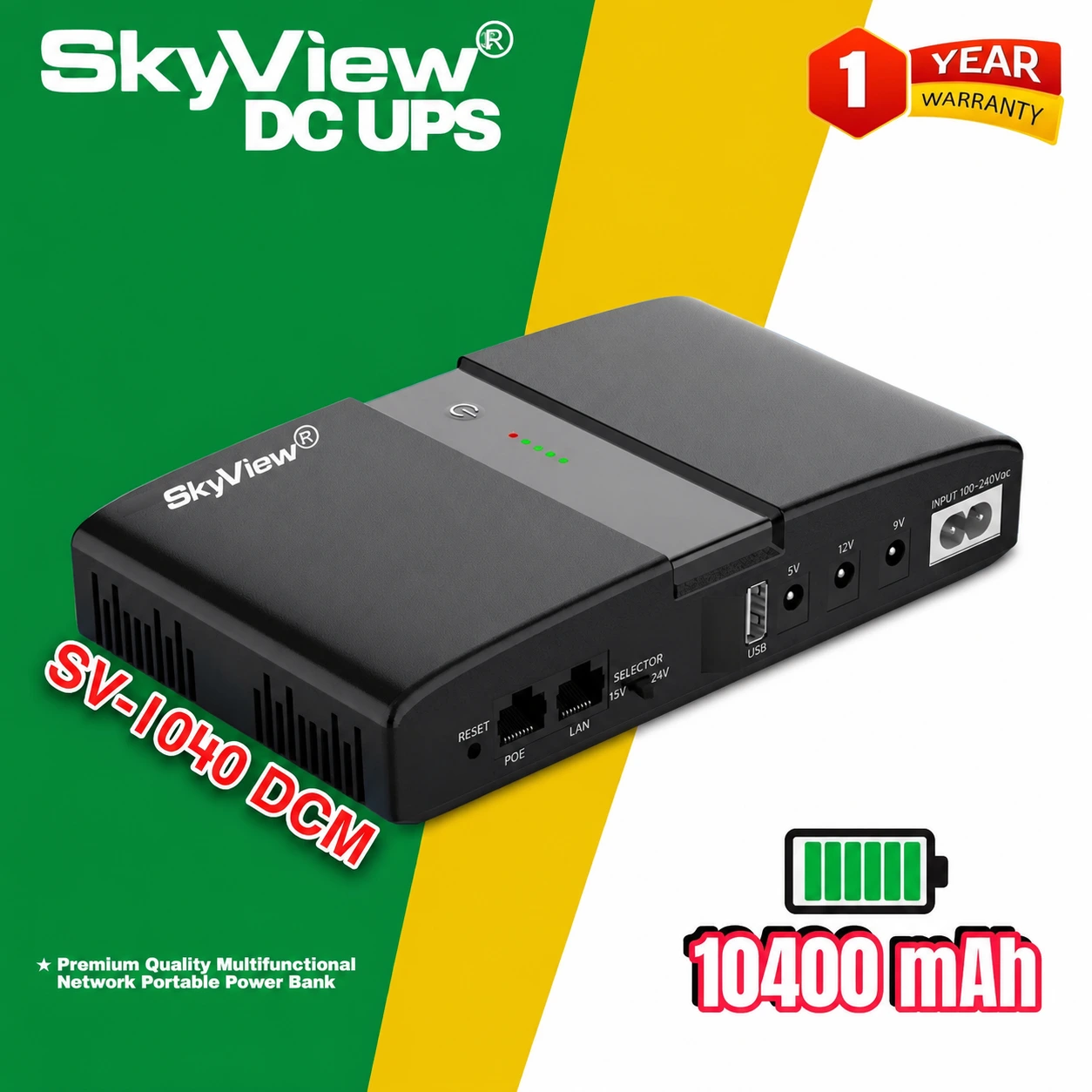
CCTV Backup Power — CCTV Backup Power deserves attention because a security camera cannot provide normal monitoring when its electrical supply is interrupted. For a shop, office or home, a short outage may affect cameras, networking equipment or both. The Skyview DC UPS SV-1040DCM is described as a 10400mAh backup solution for compatible CCTV devices, routers and ONUs. This guide explains six planning tips to help you identify essential components, understand realistic limitations and choose a sensible backup arrangement without assuming one compact unit can run an entire surveillance installation.
CCTV Backup Power: Identify the Critical Devices
Start by drawing a simple list of your security setup. You might have individual cameras, a recorder, a network switch, a router and an ONU. Some systems depend on a power adapter for each camera; others use power supplied through networking equipment. The backup plan must account for the actual devices and how they connect. A camera receiving power does not automatically mean that its recorder, internet connection or remote viewing service will continue working during an outage.
Tip 1: Match the Camera’s Electrical Requirements
Check the manufacturer’s power label on each camera and the adapter that normally supplies it. Voltage, current, connector dimensions and polarity matter. Skyview SV-1040DCM is advertised for compatible low-voltage DC equipment, but its product description does not confirm support for every CCTV model. Ask Computer Clinic to check the particular camera and the UPS output specifications before connecting them. Avoid using adapters that merely look similar; a mismatch can cause unstable operation or permanent equipment damage.
Tip 2: Separate Cameras from Recorders and Monitors
A compact DC backup device should not be assumed to replace a larger UPS for every part of a CCTV system. Recording equipment, displays and some network switches may require different voltages or more power than a mini unit can provide. Decide whether your priority is a single camera, a small compatible DC device or an entire recording setup. If several components must operate together, assess each one’s load and choose backup equipment rated for the combined requirement.
Tip 3: Keep Network Access in Your Plan
Many people use a phone to view security footage remotely. That convenience depends on more than the camera alone. A router and ONU may also need backup power, and the broadband provider must continue operating during the outage. If the camera has power but the network is offline, remote access may fail. Skyview’s listed router and ONU applications make it relevant to the conversation, but compatibility and available power still need checking. Plan the entire communication path before buying.
Tip 4: Avoid Unrealistic Runtime Promises
The 10400mAh battery capacity listed for the Skyview model is useful product information, yet it cannot be translated directly into a guaranteed number of surveillance hours. Actual backup time depends on device load, output conversion, battery condition and the number of connected components. A camera and an ONU together may consume more power than either device separately. Ask for a practical demonstration with suitable equipment and make a note of the results rather than relying on a generic estimate.
Tip 5: Install and Maintain the Unit Safely
Choose a clean, dry and ventilated position where the backup device is not exposed to rain, splashes or excessive heat. Use the recommended charging arrangement and avoid overloaded connections. Inspect cables periodically for damage or loose plugs. Do not cover ventilation openings or open the battery enclosure. If the unit behaves unexpectedly, disconnect it safely and consult a technician. A neat installation helps protect both the backup equipment and the connected camera system.
Tip 6: Test Your Security Workflow
Once the setup is verified as electrically compatible, perform a controlled power-interruption test according to the supplied instructions. Check the camera image, recording function where applicable and remote viewing if you use it. Note which features continue and which stop. Repeat the test after meaningful changes to your equipment. This is especially useful for small businesses that depend on cameras during opening hours. The goal is not just a powered indicator but a security workflow that behaves as expected.
CCTV Backup Power: Frequently Asked Questions
Can Skyview SV-1040DCM power every CCTV system?
No. It is intended for compatible low-voltage DC devices; a full system may need additional or different backup equipment.
Will remote viewing always continue?
Only when the necessary camera, network devices and provider connection remain operational.
What does 10400mAh tell me?
It identifies stated battery capacity, not a verified runtime for a specific camera or recording system.
Explore CCTV Backup Power at Computer Clinic
Good CCTV Backup Power planning starts with knowing your devices, not guessing from a battery label. The Skyview SV-1040DCM can be considered for compatible DC equipment, with careful attention to electrical ratings and a realistic backup test. Visit the Skyview DC UPS SV-1040DCM product page for current price, availability and ordering information. For general background, see how an uninterruptible power supply works.
Related reading: Skyview DC UPS SV-1040DCM: 7 Smart Router Benefits and 10400mAh Router UPS: 5 Essential Setup Tips.
Need help choosing compatible backup power? Call 01612847384 or visit Computer Clinic, Cox’s Bazar — Shop Skyview SV-1040DCM.